📝 Topics Covered
- 1. What is Clean Code?
- 2. Why Clean Code Matters
- 3. Why Do We Write Bad Code?
- 4. Rules for Meaningful Names
- 5. Rules for Functions
- 6. Rules for Comments
- 7. Common Code Smells
- 8. Key Lessons from Uncle Bob
1. What is Clean Code?
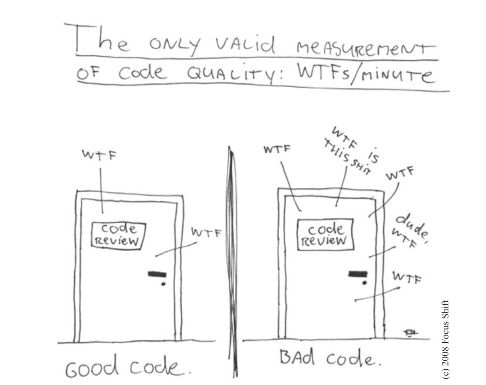
The very first step toward creating long-lasting software is figuring out how to write clean code.
- Understandability: Clean code can be
understood easilyby everyone on the development team. - Prose-Like Flow: Clean code is
simple and direct. It reads like well-written prose, making intent immediately clear. - Cared For: Clean code always looks like it was written by someone who deeply cares.
With understandability comes readability, changeability, extensibility, and maintainability.
🎥 Uncle Bob’s Clean Code: Lesson 1
2. Why Clean Code Matters
- Compounding Debt: The total cost of owning a
mess compounds over time, eventually bringing progress to a halt. - Sustainable Speed: You can only
go faston Clean Code. In messy codebases, it takes days or weeks to accomplish tasks that should take hours. - Focused Purpose: Clean code does one thing well. Bad code tries to do too much.
- Robust Verification: Clean code is
well-tested, making it stable and reliable under change. - Intelligent Predictability: When reading well-written code, every function
does pretty much what you expected. - Read-to-Write Ratio: Code is read far more often than it is written. Therefore, code that is
easier to read is easier to change.
3. Why Do We Write Bad Code?
When we produce subpar designs, it is often due to recurring psychological traps and pressures:
- The Rush: Are you in a rush to hit a deadline?
- False Speed: Do you try to go “fast” by cutting corners?
- Lack of Time: Do you feel you don’t have enough time to do a good job?
- Fatigue: Are you tired of working in the same program or module?
- Management Pressure: Does your manager push you to finish before you can refactor?
[!NOTE] Writing bad code to go faster is a paradox. The only way to go fast is to go well.
4. Rules for Meaningful Names
4.1 Use Intention-Revealing Names
Names should tell us why they exist, what they do, and how they are used. If a name requires a comment, then the name does not reveal its intent.
Bad Example:
int d; // elapsed time in days
Good Example:
int elapsedTimeInDays;
int daysSinceCreation;
4.2 Avoid Disinformation
Do not refer to a grouping of accounts as an accountList unless it is actually a List data structure. The word List means something very specific to programmers.
- If the container holding the accounts is not actually a List, it may lead to false assumptions.
- Prefer terms like
accountGroup,bunchOfAccounts, or simplyaccounts.
4.3 Make Meaningful Distinctions
Avoid changing names in an arbitrary way or appending noise words to satisfy the compiler.
- If you have a
Productclass and another calledProductInfoorProductData, you have made the names different without making their meanings different. InfoandDataare indistinct noise words (just like prefixing articles like a, an, and the).
4.4 Use Descriptive & Pronounceable Words
- Avoid culture-dependent jokes or colloquialisms (e.g., don’t use
whack()to meankill(), oreatMyShorts()to meanabort()). - Choose descriptive and unambiguous names.
- Use searchable names (avoid single-letter variables in large scopes).
- Replace magic numbers with named constants.
- Avoid encodings: Do not append Hungarian notation prefixes or type information.
4.5 Class and Method Names
- Classes & Objects: Should have
noun or noun phrasenames likeCustomer,WikiPage,Account, andAddressParser. Avoid generic verbs. - Methods: Should have
verb or verb phrasenames likepostPayment,deletePage, orsave.
5. Rules for Functions
Functions are the verbs of your programming language, while classes are the nouns.
- Do One Thing: A function should be
small. It must doone thing, do it well, and do it only. - Use Descriptive Names: A
long descriptive name is betterthan a short enigmatic name accompanied by a long descriptive comment. - Prefer Fewer Arguments: Limit the number of arguments a function accepts. Ideally, aim for 0 to 2 arguments, with 3 as an absolute maximum.
- Eliminate Flag Arguments: Do not pass booleans as flags to methods. Split the logic into separate, independent methods that can be called directly.
🎥 Uncle Bob’s Clean Code: Lesson 2
6. Rules for Comments
The proper use of comments is to compensate for our failure to express ourselves clearly in code.
6.1 Explain Yourself in Code
Do not write comments to explain messy code. Refactor the code so it explains itself.
Messy Code + Comment:
// Check to see if the employee is eligible for full benefits
if ((employee.flags & HOURLY_FLAG) && (employee.age > 65))
Clean, Self-Explanatory Code:
if (employee.isEligibleForFullBenefits())
6.2 Acceptable & Good Comments
Some comments are necessary and beneficial:
- Legal Comments: Copyright and license statements.
// Copyright (C) 2026 by Object Mentor, Inc. All rights reserved. // Released under the terms of the GNU General Public License v2. - Informative Comments: Explaining a highly technical return value.
// Returns an instance of the Responder being tested. protected abstract Responder responderInstance(); - Warning of Consequences: Alerting other developers to side effects.
// Don't run unless you have some time to kill.
public void _testWithReallyBigFile() {
    writeLinesToFile(10000000);
}
6.3 Bad & Redundant Comments
Most comments are just excuses for bad code:
- Mandated Comments: Requiring javadocs for every single trivial method or variable.
/** * @param title The title of the CD * @param author The author of the CD */ public void addCD(String title, String author) { ... } - Journal Comments: Keeping a log of changes at the top of the file. (This is what Git is for!).
- Commented-Out Code: Never leave commented-out code blocks in your repository. They collect like dregs at the bottom of a bad bottle of wine. Delete them immediately—they are preserved in version control history if you ever need them back.
7. Common Code Smells
- Rigidity: The software is
difficult to change. A small edit causes a cascade of subsequent changes across unrelated modules. - Fragility: The software
breaks in many placesdue to a single, simple change. - Immobility: You
cannot reuse partsof the code in other projects because of tight coupling and high effort. - Needless Complexity: Over-designing and adding elements before they are actually needed.
- Needless Repetition: Duplicated code blocks (violating the DRY principle).
- Opacity: The code is
hard to understand, poorly structured, and lacks expressive naming.
8. Key Lessons from Uncle Bob
8.1 Lesson 3: Engineering Standards & Competence
- Don’t Ship Shit: When you release code, you must know it works through tests. Never guess.
- Always Be Ready: Shorter sprints ensure we document well, test frequently, integrate continuously, and are always ready to deploy.
- Stable Productivity: The longer the project runs, your speed should remain stable. If velocity drops, it means a mess is slowing you down.
- Inexpensive Adaptability: Be cheap and easy to make changes to the system. If changes are expensive, your software has turned into hardware.
- Continuous Improvement: Code must get cleaner and better with time (The Boy Scout Rule: Leave the campground cleaner than you found it).
- Fearless Competence: If code needs cleaning, clean it immediately. Don’t fear it—your comprehensive tests will back you up.
- Pair Programming: Pairing spreads knowledge across the team and acts as a continuous, real-time code review.
- Honest Estimates: Define the shape of what you don’t know using a three-point estimation approach: Best Case, Nominal Case, and Worst Case.
8.2 Lesson 4: Test-Driven Development (TDD)
- The 3 Rules of TDD:
- Don’t write production code until you write a test that fails due to that code not existing.
- Don’t write more of a test than is sufficient to fail (not compiling counts as a failure).
- Don’t write more production code than is sufficient to pass the current failing test.
- Test, Don’t Debug: With comprehensive unit tests, the need to step through code with an interactive debugger drops to near zero.
- Double-Entry Bookkeeping: TDD is the software equivalent of double-entry accounting—you express the same logic twice (once in test, once in production code) to ensure complete alignment.
- Specificity vs. Generality: As tests get more specific, production code must become more general.
- Decoupled Architecture: TDD naturally drives a highly decoupled, modular architecture because untestable code is tightly coupled code.