📝 Topics Covered
- 1. Memory & Storage Systems
- 2. Database Classifications
- 3. Database Replication Strategies
- 4. RAID (Redundant Array of Independent Disks)
1. Memory & Storage Systems
To successfully design high-performance backends, you must understand the hardware physical storage hierarchy and tradeoffs between volatility, read/write speeds, and cost per gigabyte.
1.1 Volatile Storage: RAM (SRAM vs. DRAM)
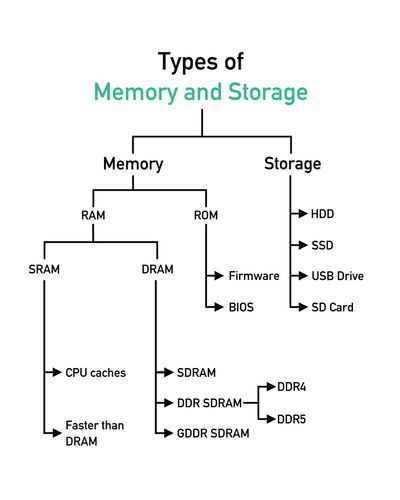
Random Access Memory (RAM) serves as the primary volatile workspace for standard CPU computational threads.
- SRAM (Static RAM):
- Keeps data intact as long as power is supplied without requiring active refresh cycles.
- Extremely fast and highly expensive.
- Used primarily for CPU L1, L2, and L3 caches.
- DRAM (Dynamic RAM):
- Stores data using capacitors that must be actively refreshed thousands of times per second.
- Slower and significantly cheaper than SRAM.
- Formats include SDRAM and DDR SDRAM (Double Data Rate SDRAM, with modern standards like
DDR4andDDR5). - Used for primary system memory (RAM).
1.2 Non-Volatile Storage: ROM, HDD, SSD
- ROM (Read-Only Memory): Non-volatile permanent storage used to write boot instructions like the motherboard BIOS or internal hardware firmware.
- Hard Disk Drive (HDD): Traditional electro-mechanical drives that store and retrieve data magnetically using rapidly rotating physical platters. High capacity but slow random read/write latency.
- Solid State Drive (SSD): New generation storage using flash-based semiconductor cells. Contains zero moving parts, operates silently, and features extremely high input/output operations per second (IOPS) compared to HDDs.
2. Database Classifications
Choosing the correct storage engine is a critical low-level and high-level design decision. Databases are broadly grouped into four modern categories:
2.1 SQL (Relational Databases)
- Design: Structured tables with fixed schemas, primary keys, and relations.
- Guarantees: Strict adherence to ACID Properties (Atomicity, Consistency, Isolation, Durability).
- Scaling: Highly optimized for vertical scaling; horizontal sharding is complex and requires careful planning.
- Examples: PostgreSQL, MySQL, MariaDB, MS SQL.
2.2 NoSQL (Document / Key-Value Databases)
- Design: Dynamic schemas (JSON documents, nested structures, or direct key-value mapping).
- Guarantees: Prioritizes horizontal scalability, partitioning, and eventually consistent models (BASE).
- Usage: Excellent for heavy read/write workloads with unstructured or semi-structured data.
- Examples: MongoDB, DynamoDB, Redis, CouchDB.
2.3 Column-Family Databases
- Design: Stores data tables as columns rather than rows.
- Guarantees: Highly optimized for analytical queries (OLAP) and high-volume write operations.
- Examples: Apache Cassandra, Hbase.
2.4 Search Engine Databases
- Design: Uses inverted indexes to perform lightning-fast, full-text lexical or semantic searches across massive text documents.
- Examples: Elasticsearch, Solr.
[!TIP] Scaling databases requires combining multiple advanced techniques: leader-follower replication, multi-leader replication, database sharding, vertical partitioning (federation), de-normalization, and query optimization. To learn database modeling, read our DBMS Guides .
3. Database Replication Strategies
Replication is the process of copying data from a primary database node to one or more replica nodes across different network zones to ensure fault tolerance, high availability, and read scaling.
3.1 Synchronous vs. Asynchronous Replication
When a write is sent to a primary node, the system replicates the update using one of two communication strategies:
Synchronous Replication
The primary node writes the update locally, broadcasts the write to all replicas, and waits for a success acknowledgement (ACK) from each replica before confirming success to the client.
- Pros: Zero replication lag; absolute consistency across all nodes.
- Cons: High write latency; if a single replica node drops offline, all write operations fail or block.
Asynchronous Replication
The primary node writes the update locally, confirms success to the client immediately, and asynchronously replicates the write to the replica nodes in the background.
- Pros: Low write latency and high write performance.
- Cons: Potential for transient data inconsistency (replication lag). If the primary node crashes before background replication finishes, data loss can occur.
3.2 Single-Master Replication (Master-Slave)
- Mechanics: The Master node handles all write operations and replicates them to one or more Slave nodes. Slave nodes handle read operations exclusively.
- Failover: If the Master node crashes, the system can continue serving read-only traffic until a Slave node is promoted to Master or a new Master node is provisioned.
[!NOTE] Single-Master replication is excellent for read-heavy systems (e.g. CDNs or data warehousing reports), but requires custom coordinator logic to manage Master failovers.
3.3 Multi-Master Replication (Master-Master)
- Mechanics: Multiple master nodes handle write and read operations simultaneously, synchronizing updates in the background.
- Failover: If one master node crashes, other master nodes absorb both write and read traffic seamlessly.
- Cons: Extremely high complexity. Requires load balancing routing, database conflict resolution protocols, and lazy synchronization that can violate strict ACID properties.
4. RAID (Redundant Array of Independent Disks)
RAID is a hardware virtualization technology that combines multiple physical hard drives into a single logical unit to improve performance (striping), reliability (mirroring), or both.
4.1 RAID 0 (Striping)
- Mechanics: Breaks files down into segments and spreads them sequentially across all drives in the array.
- Min Drives: 2
- Pros: Incredible read/write speeds because multiple drives work together in parallel.
- Cons: Zero fault tolerance. If a single disk fails, the entire array is destroyed and data is lost.
4.2 RAID 1 (Mirroring)
- Mechanics: Clones data by writing it to two identical physical drives simultaneously.
- Min Drives: 2
- Pros: High data protection and fault tolerance. If one disk fails, the array continues operating seamlessly.
- Cons: Storage capacity is cut in half; write overhead increases because data must be written twice.
4.3 RAID 10 (1+0 - Striping + Mirroring)
- Mechanics: Combines the speed benefits of RAID 0 with the redundancy of RAID 1. Data is striped across mirrored disk pairs.
- Min Drives: 4
- Pros: High performance and high fault tolerance with fast rebuild times.
- Cons: Expensive to implement because half of the total raw storage capacity is used for redundancy.

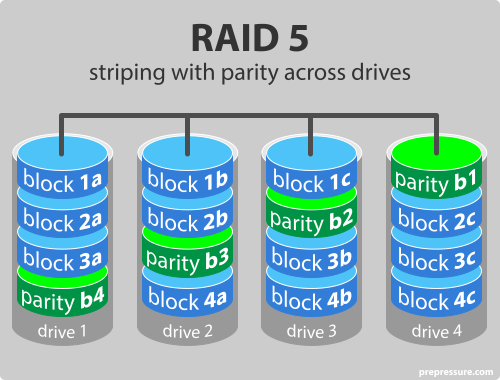
4.4 RAID 5 (Striping + Distributed Parity)
- Mechanics: Stripes data blocks across all disks alongside a distributed parity block.
- Min Drives: 3
- Pros: Space-efficient redundancy (only 1 disk’s capacity is dedicated to parity). Can withstand 1 disk failure without data loss.
- Cons: Slower write performance because parity must be recalculated and written for every block write.
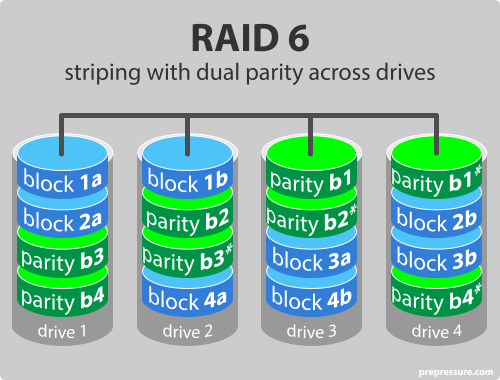
4.5 RAID 6 (Striping + Double Distributed Parity)
- Mechanics: Stripes data blocks alongside two separate distributed parity blocks.
- Min Drives: 4
- Pros: Extremely secure; can withstand 2 concurrent disk failures without data loss.
- Cons: Significantly slower write performance than RAID 5 due to double parity recalculation overhead.
5. Further Reading & References
- Donne Martin Primer: Database Replication Architecture Mechanics
- Google HLD Primer: Clustering and Master-Slave Database Syncs
- SNC Databases Index: Complete Guide to Database Management Systems