📝 Topics Covered
- 1. What is Scalability?
- 2. Vertical Scaling (Scale Up)
- 3. Horizontal Scaling (Scale Out)
- 4. Load Balancing
- 5. Caching Strategies
- 6. System Asynchronism
1. What is Scalability?
Scalability refers to the capability of a system to handle an increasing workload (both in terms of data volume and request throughput) without compromising its performance or resource efficiency.
Modern software demands can grow exponentially. To ensure that system response times remain flat under load spikes, architects must design systems to expand their capacity. This is achieved via two main vectors:
- Vertical Scaling (Scaling Up): Adding more power (CPU, RAM) to an existing machine.
- Horizontal Scaling (Scaling Out): Adding more discrete machines to a network pool.

2. Vertical Scaling (Scale Up)
Vertical scaling is the traditional method of increasing resource capacity by upgrading the physical or virtual hardware of a single host machine (e.g. adding more RAM, faster CPU cores, or larger SSDs).
- Example Upgrades:
- Scaling an AWS EC2 instance type from
t2.nano(0.5 GiB RAM, 1 vCPU) tot2.medium(4 GiB RAM, 2 vCPUs). - Upgrading localized storage from standard HDD arrays to high-throughput NVMe SSD storage.
- Scaling an AWS EC2 instance type from
2.1 Pros & Cons of Vertical Scaling
- Pros:
- Zero Code Complexity: No architectural changes are needed; applications run exactly the same way.
- Low Maintenance Overhead: Only one server operating system to patch, configure, and monitor.
- Minimal Initial Costs: Upgrading a single server is initially cheaper than coordinating a cluster of nodes.
- Cons:
- Hard Hardware Limits: You will eventually hit a ceiling where single-machine hardware upgrades are physically impossible or prohibitively expensive.
- Single Point of Failure (SPOF): If your single server fails, the entire application suffers complete downtime.
- Forced Downtime: Hardware modifications and vertical reboots require taking the host offline.
3. Horizontal Scaling (Scale Out)
Horizontal scaling involves adding new machines to the application pool to handle increased request traffic. Workloads are distributed dynamically across multiple connected machines, improving overall system resilience.
To successfully scale horizontally, systems require an intermediary routing node called a Load Balancer.
3.1 Pros & Cons of Horizontal Scaling
- Pros:
- Infinite Capacity Potential: No physical hardware ceilings; you can theoretically add hundreds of nodes.
- High Availability & Fault Tolerance: If one node crashes, other nodes absorb the traffic with zero user-facing downtime.
- Dynamic Autoscaling: Nodes can be automatically spun up or terminated programmatically based on real-time traffic rules.
- Cons:
- Extreme Architectural Complexity: Requires stateless servers, centralized session management, and careful data synchronization.
- Data Consistency Challenges: Replicating writes across multiple databases introduces eventual consistency issues (CAP Theorem constraints).
- Sub-Techniques Needed: Requires coordinating advanced techniques like load balancing, database replication, and database sharding.
4. Load Balancing
A load balancer acts as a traffic cop sitting in front of your server cluster. It intercept client requests and routes them across all active backend servers to ensure that no single machine becomes overloaded.
- Load Balancer Types:
- Software-Based: HAProxy, Nginx, Linux Virtual Server (LVS), AWS Elastic Load Balancer (ELB).
- Hardware-Based: Barracuda, Cisco, Citrix NetScaler, F5 BIG-IP.

4.1 Load Balancing Routing Algorithms
- Round-robin: Distributes incoming requests to backend servers sequentially
in rotation. - Weighted Round-robin: Accounts for varying server capabilities by routing proportionally more requests to high-performing nodes based on configured weights.
- Least Connections: Automatically routes new requests to the server with the
fewest current connections. - Least Response Time: Evaluates active connections and combines them with the
fastest response timetelemetry to pick the optimal server. - Least Bandwidth: Measures current network traffic in Megabits per second (Mbps), directing new requests to the server with the lowest bandwidth utilization.
- Hashing: Generates a hash key based on request parameters (like the
client IP addressor URL) to consistently route a specific request to the same target server.
4.2 Sticky Sessions (Session Persistence)
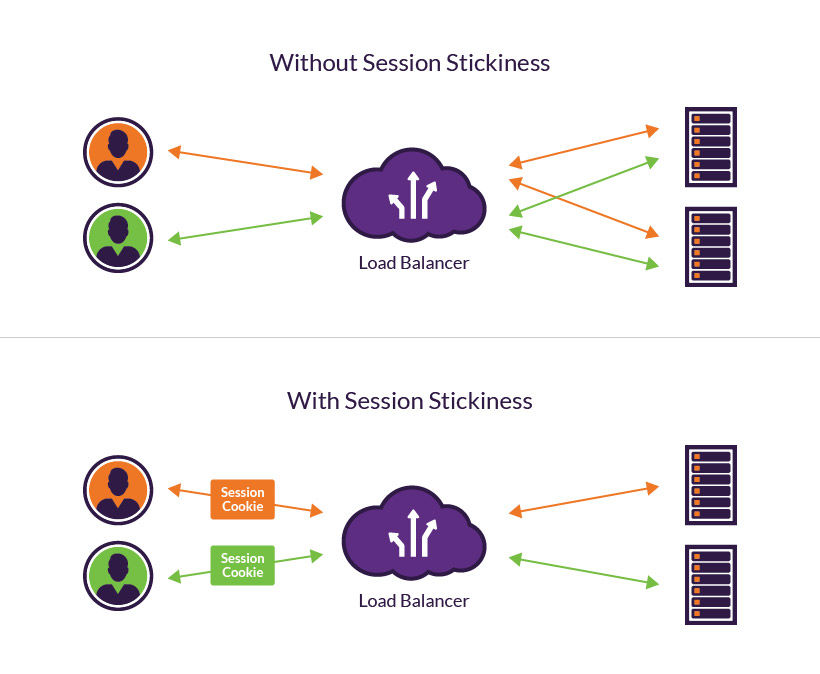
Session stickiness (or session persistence) is a technique where a load balancer creates an affinity between a client and a specific server for the duration of a session.
This ensures that all sequential requests from a single user land on the exact same backend server, which is useful when session data is stored locally in the server’s memory.
- Implementation Strategies:
- Cookies: The load balancer injects a specialized tracking cookie (e.g.
Server_ID) into the client’s browser headers. - IP Hashing: The load balancer uses the client’s source IP address to compute a hash key that always maps to the same node.
- Cookies: The load balancer injects a specialized tracking cookie (e.g.
5. Caching Strategies
Caching is the practice of storing frequently accessed data in a fast, volatile storage medium (like RAM) to bypass expensive disk reads or computational loops.
Caching significantly decreases system latency and reduces the load on primary databases.
5.1 CPU-Level Caching (L1, L2, L3)
Before exploring network-level caching, it is helpful to understand localized CPU cache hierarchies:
- L1 Cache: The smallest and fastest cache layer, integrated directly inside the CPU core.
- L2 Cache: Larger and slightly slower than L1, located near individual CPU cores.
- L3 Cache: The largest and slowest CPU cache layer, shared between all CPU cores.
5.2 Common Caching Engines
- Redis: A versatile, in-memory key-value data structure store supporting advanced types (lists, sets, hashes, sorted sets) and clustering.
- Memcached: A simple, high-performance, multithreaded key-value memory cache.
- Amazon ElastiCache: A managed, scalable Redis or Memcached service hosted in AWS.
5.3 Cache Invalidation & Writing Patterns
When data in the primary database is modified, the cache must be updated or invalidated to prevent serving stale data to clients.
Pattern 1: Cache-Aside (Lazy Loading)
The application server acts as the orchestrator. The cache does not communicate directly with the database.
- The application checks the cache for the requested data.
- If a cache miss occurs, the application queries the primary database.
- The application then writes the queried data into the cache for future requests.
- Finally, the data is returned to the client.
- Staleness Risk: Data can become stale if database updates occur without cache invalidation. This is typically managed using a Time-To-Live (TTL) expiration policy.

Pattern 2: Write-Through Cache
The application writes data directly to the cache, and the cache synchronously updates the database before confirming the write.
- Pros: Fast subsequent reads and absolute data consistency.
- Cons: Higher write latency due to synchronous two-step writes.

Pattern 3: Write-Around Cache
The application writes data directly to the primary database, bypassing the cache entirely.
- Pros: Prevents flooding the cache with write operations that may not be read immediately.
- Cons: Increases cache misses and initial read latency for recently written data.

Pattern 4: Write-Back (Write-Behind) Cache
The application writes data directly to the cache layer, which confirms the write immediately. The cache then asynchronously writes the update to the primary database in the background.
- Pros: Extremely fast write performance and database write buffering.
- Cons: High risk of data loss if the volatile cache crashes before syncing to the database.

5.4 Cache Eviction Policies
When a cache runs out of memory, it must evict older entries to make room for new data based on an eviction policy:
- First In First Out (FIFO): Evicts the oldest entry based on when it was added to the cache, regardless of how often it has been accessed.
- Last In First Out (LIFO): Evicts the entry that was added most recently.
- Least Recently Used (LRU): Tracks access timestamps and discards the entry that has not been accessed for the longest period.
- Most Recently Used (MRU): Discards the entry that was accessed most recently.
- Least Frequently Used (LFU): Tracks access counts and evicts the entry with the lowest access frequency.
- Random Replacement (RR): Randomly selects an entry to discard.
6. System Asynchronism
- Synchronous Workflows: Operations execute sequentially. Each step blocks execution and must wait for the preceding step to complete.
- Example: A real-time phone call or standard single-threaded synchronous code.
- Asynchronous Workflows: Operations execute independently in the background. The main execution thread continues immediately without waiting for the background task to complete.
- Example: An email workflow or non-blocking asynchronous event loops.
Asynchronism helps improve system performance by moving slow, expensive operations (like generating invoices or processing videos) out of the critical request-response cycle.
In a microservices architecture, asynchronism is primarily achieved using Message Queues and Message Brokers.
6.1 Message & Task Queues (Point-to-Point)
A message queue provides a asynchronous communications protocol using a FIFO queue data structure. The sender pushes a message onto the queue and continues processing without waiting for an immediate response.
[!NOTE] Standard message queues are typically limited to one-to-one communication. Each message in the queue is processed only once by a single consumer.
- Typical Technologies: Microsoft Message Queuing (MSMQ), Amazon Simple Queue Service (SQS).
- Producer-Consumer Model: The producer adds tasks to the queue, and a dedicated worker (consumer) processes them asynchronously.
6.2 Message Brokers (Publish-Subscribe)
A message broker is a more advanced system component that manages queues and supports a one-to-many (Publish-Subscribe) messaging model.
Instead of targeting a specific queue, a producer (publisher) broadcasts a message to a topic. Any consumer service that has subscribed to that topic will receive a copy of the message.
- Typical Technologies: RabbitMQ, Apache Kafka, ActiveMQ.
- Publish-Subscribe Model: Enables decoupling between publishers and subscribers. Publishers do not need to know which services are consuming their messages.
7. References & Deep Dives
- Scale Architecture: Horizontal vs. Vertical Scaling In-Depth Guide
- Sticky Sessions: Session Stickiness Persistence and Cookies
- Message Architecture: Message Queues and System Design Patterns
- GitHub Repository: Karan Pratap Singh System Design Caching Primer