📝 Topics Covered
- 1. What is a Design Pattern?
- 2. Design Patterns vs. Algorithms
- 3. The Three Classifications of Patterns
- 4. Cheat Sheet: Catalog of Design Patterns
1. What is a Design Pattern?
Patterns are typical solutions to common problems encountered in object-oriented design. They are not specific blocks of copy-pasteable code, but rather pre-made blueprints that you can customize to solve recurring design challenges in your own codebase.
When a particular architectural solution is repeated over and over across various software projects, developers eventually standardize it and assign it a name.
[!NOTE] A design pattern is a walkthrough of a
well-tested approachto solving agenerally occurring, recurring problemin object-oriented software design.
These solve common low-level challenges such as:
- How classes are defined and instantiated.
- How complex structures are assembled.
- How independent components communicate and share state.
🎥 Intro to Design Patterns
2. Design Patterns vs. Algorithms
Patterns are often confused with algorithms because both concepts describe typical, proven solutions to known problems. However:
- An Algorithm: Defines a
clear, rigid set of actionsthat leads step-by-step to a specific computational goal. - A Design Pattern: Is a
high-level description of a solutionor architectural blueprint. The implementation details of the same pattern applied to two different applications will look completely different.
3. The Three Classifications of Patterns

Design patterns are categorized into three main families based on their underlying purpose:
Creational Patterns
These deal with creation and instantiation of objects.
- They provide
object creationmechanisms thatincrease flexibility and reuseof existing code. - They ensure that object creation logic is decoupled from the client system.
Structural Patterns
These govern how classes and objects are structured and organized into larger hierarchies.
- They explain how to
assemble objects and classesinto larger structures while keeping the structures flexible and efficient. - They allow separate components to work together seamlessly.
Behavioral Patterns
These dictate how objects or components communicate with one another.
- They handle how objects
communicateand interact, as well as how theyshare responsibilitiesat runtime.
4. Cheat Sheet: Catalog of Design Patterns
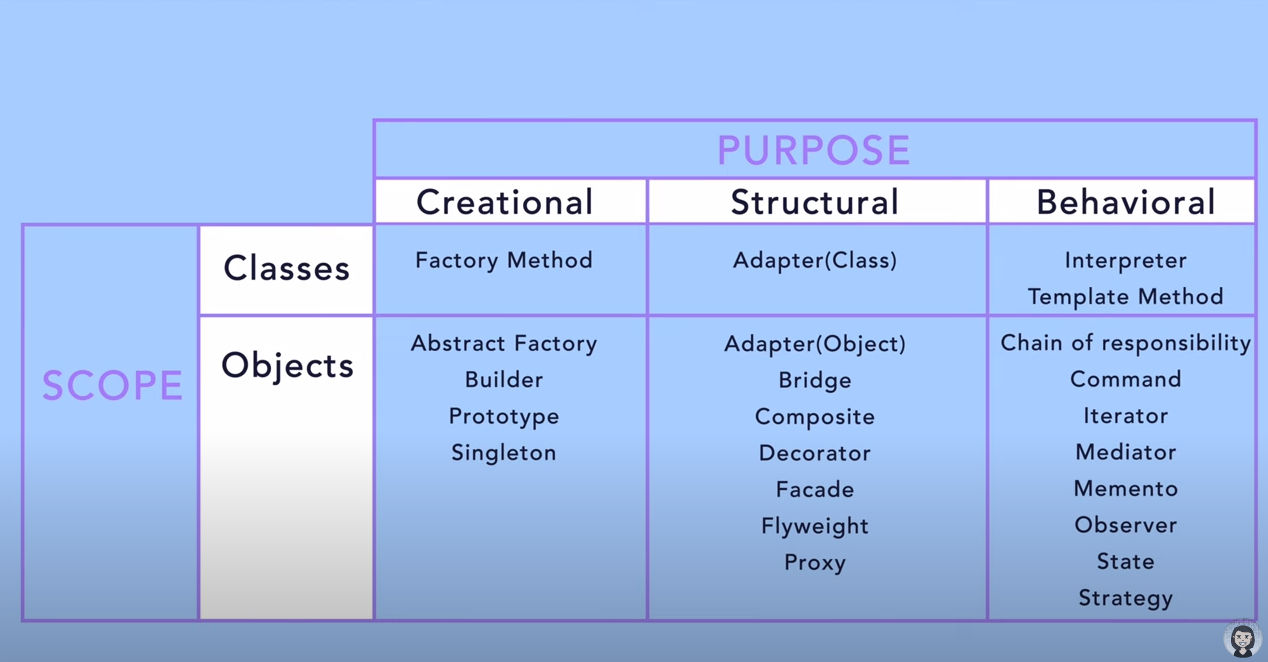
The standard Gang of Four (GoF) catalog is divided into clear functional blocks:
4.1 Creational Patterns
- Factory Method (Class-scoped): Defers instantiation to subclasses.
- Abstract Factory: Creates families of related objects without specifying concrete classes.
- Builder: Constructing a complex object step-by-step.
- Prototype: Clones existing objects instead of creating new instances.
- Singleton: Restricts a class to a single global instance.
4.2 Structural Patterns
- Adapter (Class/Object): Allows incompatible interfaces to work together.
- Bridge: Separates an abstraction from its implementation.
- Composite: Treats individual objects and compositions of objects uniformly.
- Decorator: Attaches additional responsibilities to an object dynamically.
- Flyweight: Shares fine-grained state to minimize memory footprint.
- Proxy: Provides a placeholder or surrogate control access.
- Facade: Simplifies a complex subsystem behind a unified interface.
4.3 Behavioral Patterns
- Interpreter: Defines a grammatical representation for a language.
- Template Method: Defines the skeleton of an algorithm, deferring steps to subclasses.
- Observer: Implements a subscription mechanism to notify multiple dependent observers.
- Chain of Responsibility: Passes requests along a chain of potential handlers.
- Command: Encapsulates a request as an independent, executable object.
- Iterator: Sequentially accesses elements of a collection without exposing its structure.
🎥 Deep Dive: Types of Design Patterns
Reference
- Scaler Topics: What are Design Patterns?
- YouTube Course: Keerti Purswani - Design Pattern Series
- YouTube Playlist: sudoCode - Design Patterns
- SourceMaking: Interactive Design Patterns Catalog
- ByteByteGo: Design Patterns Cheat Sheet
- YouTube Course: Christopher Okhravi - Design Patterns
- YouTube Course: Derek Banas - Design Patterns Tutorial