📝 Topics Covered
- 1. Software Engineering
- 1.1 History of Software Engineering
- 2. Software Development Life Cycle (SDLC)
- 2.1 Why is the SDLC Important?
- 2.2 SDLC Phases
- 3. SDLC Models
- 3.1 Classical Waterfall Model
- 3.2 Iterative Waterfall Model
- 3.3 Prototype Model
- 3.4 Incremental Model
- 3.5 Spiral Model
- 3.6 Agile Model
1. Software Engineering
Software Engineering is related to the evolution of software product using well-defined scientific principles, techniques, and procedures.
The result of software engineering is an effective and reliable software product.
Why do we need Software Engineering?
- Managing Complexity: It provides frameworks to build and manage large, complex software systems without losing control.
- Scalability: Ensures the software can grow seamlessly with increasing user demands.
- Cost Management: Prevents budget overruns through careful planning and estimation.
- Quality Assurance: Guarantees a reliable, secure, and bug-free end product.
1.1 History of Software Engineering
- 1940s – 1950s: Early software development was pioneered by giants like IBM and NASA, heavily relying on simple
"build and deliver" methodswithout strict processes. - 1945 – 1965 (The Origins): The formal concept of software engineering was introduced by the NATO Science Committee to address growing complexities.
- 1965 – 1985 (The Software Crisis): Many software projects failed, went wildly over budget, or were delivered late (e.g., IBM OS/360). Maintenance became incredibly expensive.
- 1990s:
The prominence of the Internet, the World Wide Web, and modern operating systems shifted how software was distributed and built. - 2000s: The rise of
lightweight methodologies, specificallyAgile, transformed the industry. - 2010s – Present: The era of Cloud Computing, Artificial Intelligence (AI), Machine Learning (ML), and Deep Learning.
2. Software Development Life Cycle (SDLC)
The Software Development Life Cycle (SDLC) is a systematic, disciplined, and cost-effective methodology for developing software.
The primary aim of the SDLC is to produce high-quality software that meets or exceeds customer expectations, reaches completion within time and cost estimates, and works effectively.
It consists of a detailed plan explaining how to plan, build, test, deploy, and maintain specific software.
2.1 Why is the SDLC Important?
- Project Planning & Estimation: It offers a structured basis for scheduling, budgeting, and estimating resources.
- Standardized Framework: Provides a standard set of activities and deliverables for the entire team.
- Tracking & Control: Acts as a mechanism for project tracking, ensuring nothing falls through the cracks.
- Transparency: Increases the visibility of project progress to all involved stakeholders.
- Risk Management: Helps decrease project risks and management overhead while enhancing overall development speed.
2.2 SDLC Phases

- Requirement Gathering and Analysis: This phase involves calculating labor and material costs, creating a timetable with target goals, and establishing the project’s teams and leadership structure.
It's about understanding exactly what the customer wants. - Feasibility Study: The team
defines and documents the software needsin an SRS Document (Software Requirements Specification). This involves 5 checks: Economic, Legal, Operational, Technical, and Schedule feasibility. - Design: Using the SRS document, the system and software design documents are prepared. This is where
High-Level Design (HLD) and Low-Level Design (LLD) architectures are finalized. - Coding: The actual development begins here. It is
typically the longest phaseof the SDLC process. - Testing:
QA engineers rigorously test the codeagainst the requirements to ensure there are no bugs and that the product behaves exactly as expected. - Deployment: The software is deployed to production environments so end-users can start utilizing it.
- Maintenance: The software is continuously monitored. This involves:
- Bug Fixing:
Resolving issuesdiscovered in obscure edge-case scenarios. - Upgrades:
Updating the applicationto newer versions of underlying software or frameworks. - Enhancements:
Adding new featuresto the existing software.
- Bug Fixing:
3. SDLC Models
Over the years, various SDLC models have been created to suit different types of projects and organizational structures.
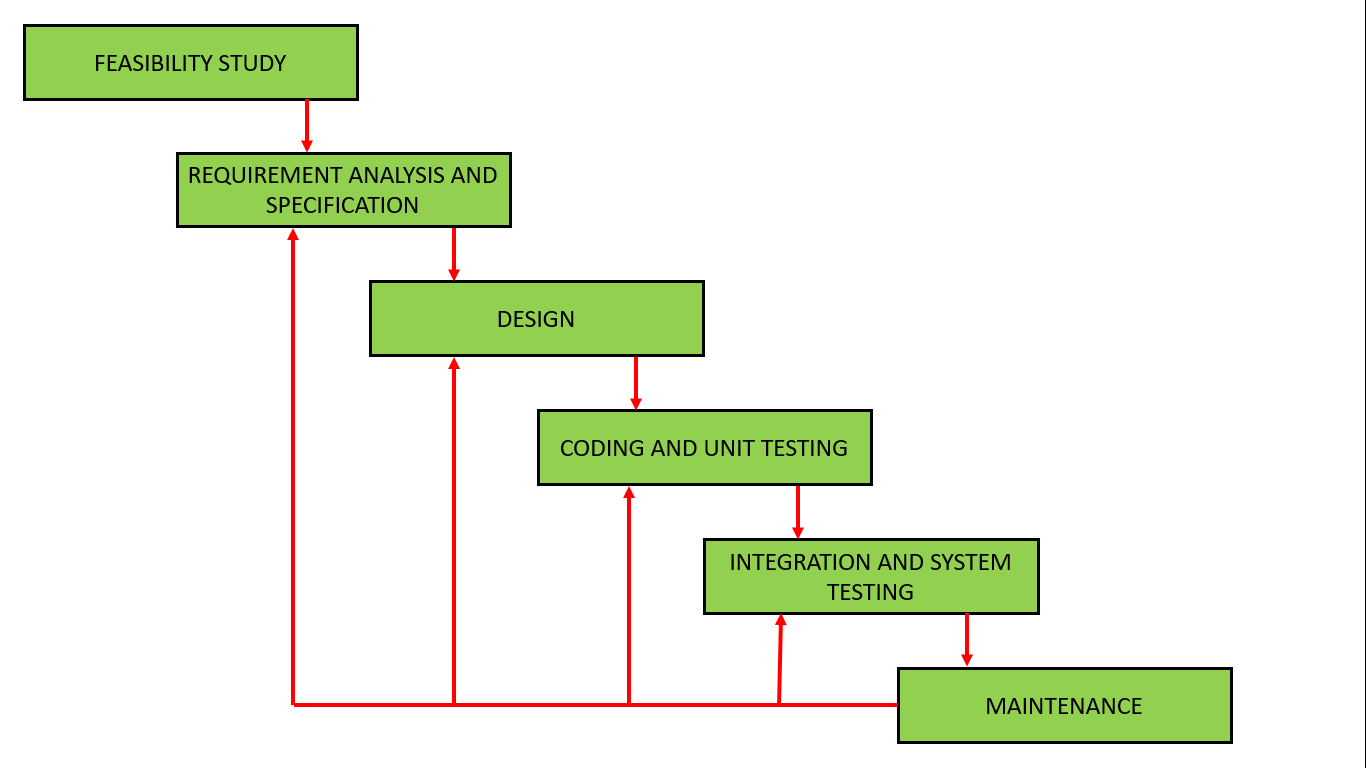
3.1 Classical Waterfall Model
The Classical Waterfall model is a sequential, linear approach.
It is simple but highly idealistic.
While it is rarely used in modern development because it is rigid and inflexible, it remains important because all other SDLC models are based on the classical waterfall model.
The outcome of one phase acts as the input for the next phase. i.e. development process can be considered as a sequential flow
Pros:
- Forms the base model for understanding software development.
- Extremely simple and easy to manage.
- Good for small projects with crystal clear requirements.
Cons:
- No feedback path; mistakes found later are devastating.
- Strictly sequential flow prevents parallel work.

3.2 Iterative Waterfall Model
This model improves on the classical approach by providing feedback paths from every phase back to its preceding phases. The core problem still needs to be well understood from the beginning.
Pros:
- Simple and easy to follow.
- Great for smaller projects.
- Introduces a feedback path to fix errors in earlier phases.
Cons:
- Still heavily sequential.
- No incremental delivery of value to the user.
3.3 Prototype Model
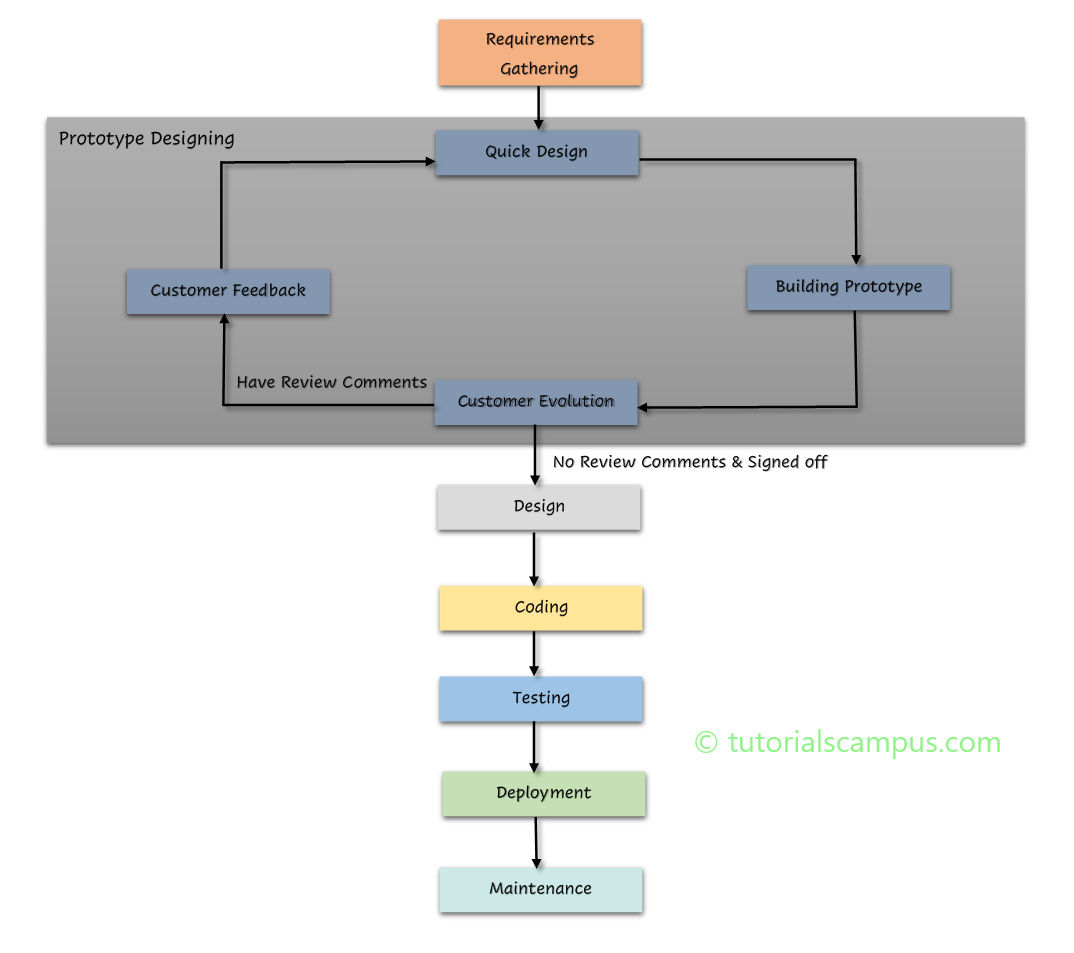
This model is highly effective when user requirements are not entirely clear. Before building the actual software, a working prototype of the system is built, tested, and refined based on customer feedback.
Pros:
- Drastically reduces the risk of incorrect user requirements.
- Supports early product marketing and user testing.
Cons:
- Building prototypes can be
expensive and time-consuming. - Special tools and techniques are often required just for prototyping.
3.4 Incremental Model
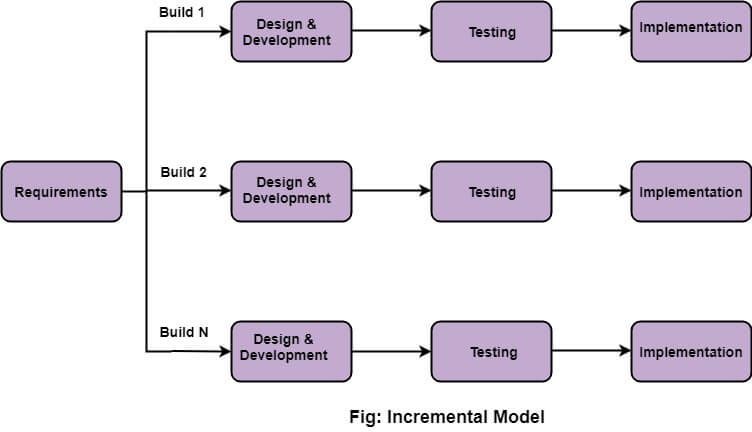
The Incremental Model divides the total requirements into multiple standalone modules. The software is built and delivered module by module, making it easier to test and debug smaller chunks of logic.
Pros:
- Errors are easily recognized early on.
- Much easier to test and debug smaller modules.
- Initial delivery cost is low, and the client gets important functionality quickly.
Cons:
- The total overall cost of the project tends to be higher.
3.5 Spiral Model
The Spiral Model combines iterative development with systematic risk management. It is ideal for large, complex projects where requirements cannot be locked in early.
Pros:
- Exceptional risk handling and mitigation.
- Perfect for large, mission-critical projects.
- High flexibility in accommodating changing requirements.
Cons:
- Extremely complex to manage.
- Expensive to execute.
- Heavily dependent on highly skilled risk analysts.

3.6 Agile Model
The Agile Model is a combination of iterative and incremental process models and is the industry standard today. It focuses on process adaptability and customer satisfaction through the rapid, continuous delivery of working software.
Agile breaks the product into small incremental builds provided in short iterations (often called "sprints"). At the end of each iteration, a working product is displayed to the customer and stakeholders for immediate feedback.
Pros:
- Frequent, predictable delivery of working software.
- Encourages face-to-face communication with clients.
- Highly adaptable; changes are acceptable at almost any stage.
- Reduces total development time and eliminates wasted effort.
Cons:
- Often results in less formal documentation.
- Can create long-term maintenance challenges if architecture isn’t planned carefully.
